Hi, I'm Anna—the kind of person whose printer can turn “Hello” into “Hell0.”
Last week, I just wanted to make a weekend bagel club poster, but the word “Baggel Club” actually appeared on it—yes, I almost thought I'd invented a new word. That's when I decided to try GLM-Image, the AI that claims it won't mess up spellings. On the first try, the poster came out flawless. I even wondered if it had secretly read my mind.
Next, I'll explain what GLM-Image actually is, why it makes text behave so well, and how effortlessly it handled my little task.
What Is GLM-Image?
GLM-Image is Zhipu AI's text-to-image model that's unusually good at rendering accurate text inside images, signs, labels, posters, UI mockups. If you’ve used Stable Diffusion or Flux and gotten “almost-right” lettering, you know why this matters.
I tested GLM-Image this week (January 2026), mostly for small, real tasks: a community flyer, a café table sign, and a few social graphics for a class I’m running. Not gonna lie, it consistently spelled things correctly without me adding any arcane prompt tricks. I still tweaked prompts, but the baseline was solid.
A tiny example: I asked for "Sunday Bagel Club, 9:00 AM" on a warm, minimalist poster with a cream background and one illustration. GLM-Image placed the text cleanly, no weird ligatures, no phantom letters. When I tried the same prompt in a vanilla SDXL setup, the best image still had a slightly mangled "Sunday." Not disastrous, but honestly, not something I’d print without a headache.
The Team Behind It (Zhipu AI)
Zhipu AI (the group behind the GLM-4 language series and the GLM-4V multimodal models) builds research-heavy models with a practical streak. GLM-Image fits that pattern: it feels trained not just to create pretty pictures, but to respect exact strings. If you've seen their work on multilingual reasoning and vision, the typography discipline here makes sense. They're good at mapping symbols to meaning and keeping them intact.
If you want official info, Zhipu's docs and model pages are the best source. I didn't see exhaustive architectural papers for GLM-Image in the wild UI I used, but the behavior is consistent enough to recommend for text-forward tasks.
Why Text Rendering Works Better
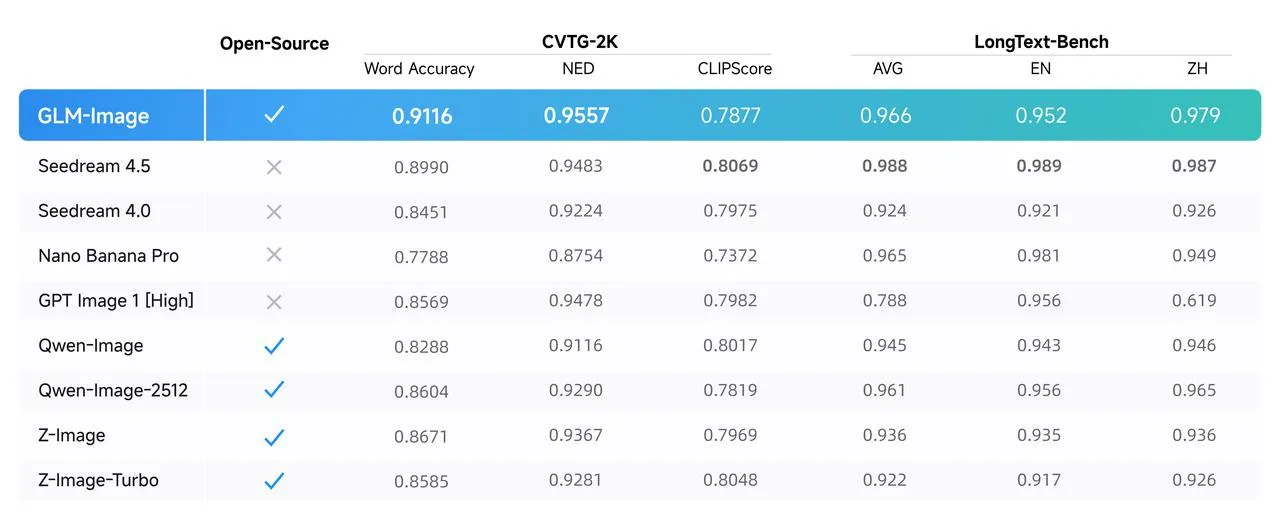
I don’t need a whitepaper to notice when letters stop melting. But, if you’re nerdy like me, a little context helps.
- What I felt in practice: prompts with exact phrases (event names, dates, short taglines) come out correctly more often. No need to over-specify “ALL-CAPS, bold, left aligned, no extra letters”—thankfully.
- Where it helps mentally: fewer retries and less babysitting. After 3–4 runs, I was picking between styles, not fighting the alphabet.
Architecture Difference vs Flux & SD
This is the short, practical version:
- Stable Diffusion (SDXL and friends) is fantastic at variety, but its U-Net diffusion roots and training data make long, exact text inside the image a recurring weak spot. It's gotten better with hacks (inpainting, ControlNet, region prompts), but it still slips.
- Flux uses a modern transformer-style backbone with flow-matching training. In my tests, Flux is snappier and cleaner than older SD builds, and it does better with short text, still, it occasionally invents or drops characters under style pressure.
- GLM-Image behaves like a diffusion-transformer that's been explicitly conditioned on character-level faithfulness. I can't confirm the exact recipe, but the outputs suggest stronger supervision for typography and multilingual text. It "respects" the string, even when the scene gets stylized.
Bottom line: if your image depends on a precise phrase, GLM-Image wastes less of your time. If you’re exploring wild aesthetics and don’t care about text, the gap narrows. Pick whatever fits your vibe.
Best Use Cases
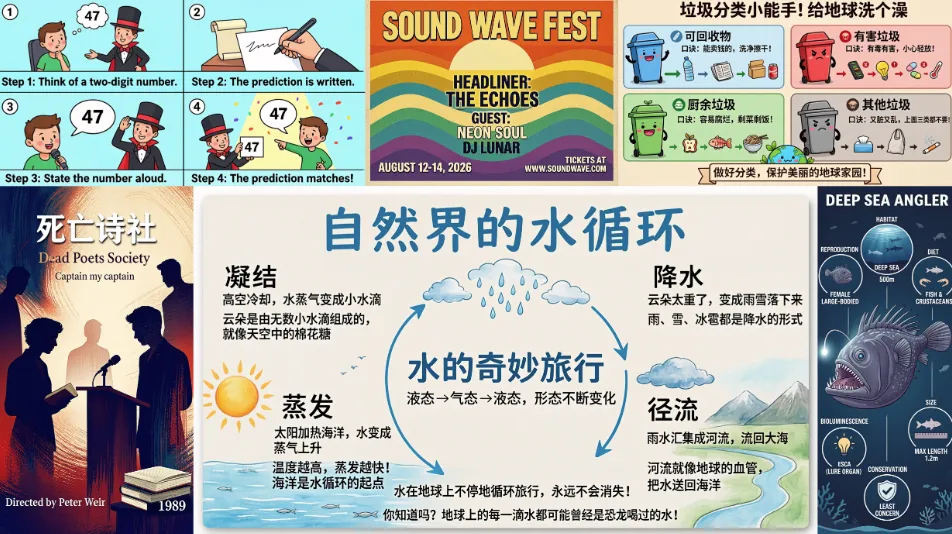
Frankly, here's where GLM-Image actually helped me, not just theoretically:
- Posters and one-off flyers: community events, class schedules, tiny announcements for a hallway corkboard. Fewer misspellings means I stop iterating sooner.
- Social graphics with dates or promo codes: Instagram story panels, pinned tweets, YouTube thumbnails. The text doesn't wobble. Seriously, it’s nice not to babysit the letters.
- Labels and signage: café table tents, pantry labels, stickers for gear cases. You can nudge layout in the prompt and expect the wording to survive.
- Lightweight UI mockups: fake app screens and dashboards where you want convincing copy, not lorem ipsum soup.
- Study cards or visual notes: clean, minimal designs with clear headings. It's not a flashcard app, but it can crank out a set of consistent visuals quickly.
Who will like it: anyone who wants a gentle assistant for little visual tasks without fussing with post-processing.
Who won't: people who need pixel-perfect brand layouts every time, or who already have a Photoshop muscle memory that's faster than prompting. Also, if you never put text in your images, GLM-Image's advantage shrinks.
How to Try It Now
I used the official Zhipu AI web playground attached to my account, then moved to the API for repeatable runs. The flow was simple enough that I didn't need a tutorial:
- Get access: create an account with Zhipu AI and open their image playground. There's typically an English UI toggle. If you prefer code, generate an API key in the console.
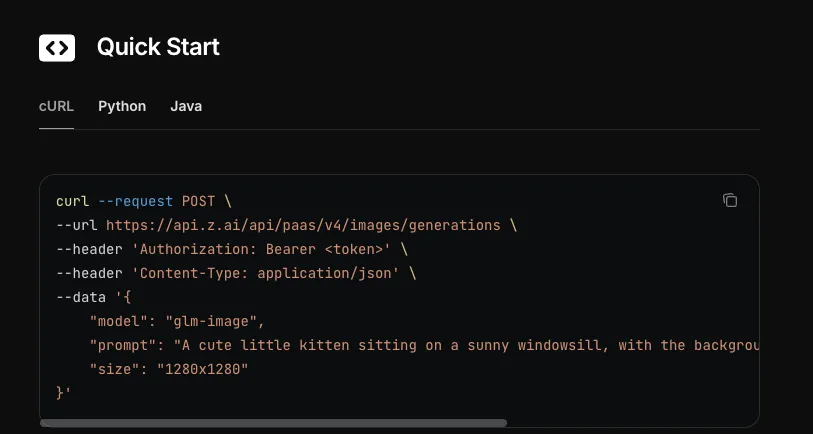
- Start small: give it a specific phrase you care about (e.g., "Sunday Bagel Club, 9:00 AM"). Add 1–2 style hints ("warm minimalist poster, cream background, centered layout"). Resist the urge to overcook the prompt—trust me.
- Iterate with constraints: if the text drifts, say what should happen to it, not just the vibe. I've used lines like "preserve exact spelling and punctuation" and "place text top-center, single line." It listens more than most.
- Use light post-edits: I still nudge spacing in a design tool. The difference is I'm tweaking, not reconstructing letters.
- Save seeds for consistency: when you land on a look you like, reuse the seed to generate a small set (A/B options for a client or your own future self).
If you're in a comfy local workflow, check whether your favorite UI has a GLM-Image connector or an OpenAI-compatible endpoint. Worst case, the web app is fine for quick tasks. I timed a few runs: first usable poster in ~2 minutes: final printable version after two iterations in ~7. That's… reasonable.
One limitation I hit: long paragraphs still get messy. Short headlines and labels are the sweet spot. And like every model, it occasionally centers text a bit too lovingly, I ask for "left-aligned" and sometimes get "left-ish." Manageable, but worth noting.
While GLM-Image handles your words beautifully, sometimes life throws other little tasks at you. By the way, if you want a little helper for daily chores, task organization, or just whipping up simple posters and copy without fuss, our Macaron is perfect. It doesn’t fight you—it actually makes life easier and helps you get more done. Definitely worth a try. One thing I especially like: Macaron can even generate a small tool for proofreading and correcting text. So instead of manually scanning your poster, social graphic, or class notes for typos, it can check everything for you and suggest fixes. For someone like me who obsesses over that one ghost letter in “Sunday,” this is a tiny lifesaver.
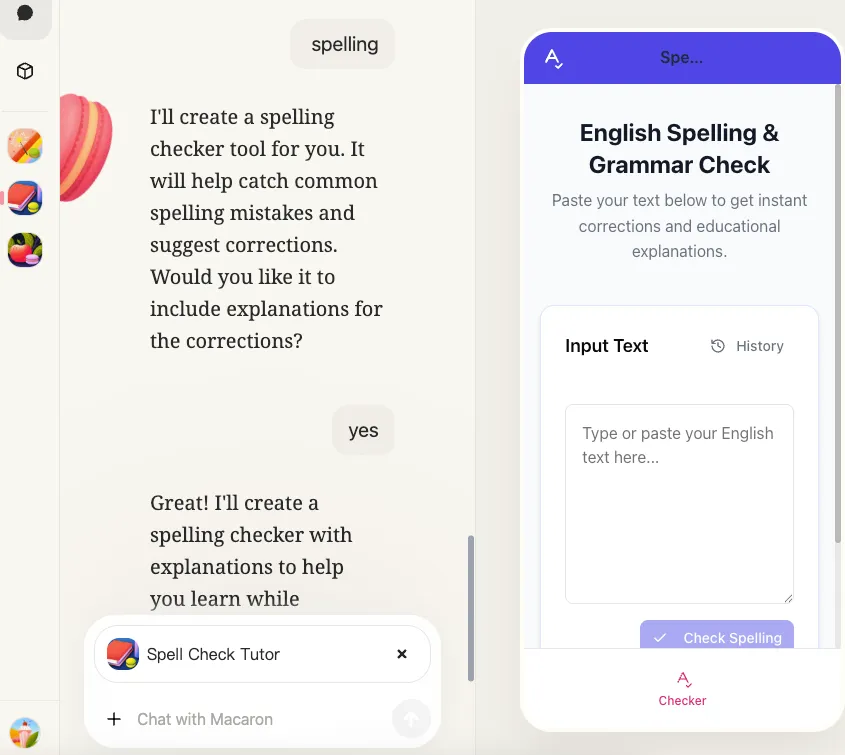
I’m not turning this into a habit tracker or “design workflow.” I just reached for a tool, it didn’t fight me, and I’ll keep it around—especially for anything with words. Curious to see if the spelling discipline holds up when I switch languages next week.
If you've ever gone crazy over that ghost letter in “Sunday” on a poster, I guarantee GLM-Image will save you a few strands of hair. Want to challenge it? Leave a comment telling me which phrase you're most afraid it'll “creatively rewrite” into weird fonts, and I'll test it out for you.





Apply to become Macaron's first friends
Ettevõte
Sirvi blogisid tähestiku järgi
Sirvi blogisid kuupäeva järgi
Resources
- All tools
- Anorexic BMI Calculator
- Payback Period Calculator
- Stair Calculator
- Engine Horsepower Calculator
- Estate Tax Calculator
- Weight Watcher Points Calculator
- Lean Body Mass Calculator
- Horsepower Calculator
- Cash Back or Low Interest Calculator
- Fat Intake Calculator
- Voltage Drop Calculator
- Number Sequence Calculator
- Roofing Calculator
- Percent Error Calculator
- Internal Rate of Return (IRR) Calculator
- Density Calculator
- Golf Handicap Calculator
- Statistics Calculator
- Greatest Common Factor Calculator


