Hermes Desktop Review 2026: Can It Become Personal AI?
Hermes Desktop Review 2026: Can It Become Personal AI?

This Hermes Desktop review finds a capable native interface for a configurable agent, but not a system that demonstrably knows you deeply. The Hermes Desktop app may suit technically comfortable users who want sessions, files, Skills, memory, and model choices together. Reusable procedures and saved notes create continuity without proving personal understanding. This is an evidence-based review of current official materials, not a hands-on performance test. For the broader category, see our Personal AI agent guide.
Quick Verdict for Everyday Users
For a Hermes Desktop 2026 verdict: it is promising if you want an agent you can configure and supervise, not an effortless consumer companion.
- Ready now: Official materials confirm chat, live tool activity, sessions, files, previews, voice, model selection, Skills, memory views, and profiles.
- Setup burden: You choose a provider, manage credentials and permissions, and decide where the agent runs.
- Continuity: Sessions preserve conversations, Skills preserve procedures, and memory preserves selected notes. None proves deep personal understanding.
- Official unknowns: Platform-specific silent updates and all residual files are not documented equally.
What Hermes Desktop Is Today
A Native Interface for the Hermes Agent Core
Nous Research describes the Hermes Agent desktop interface as a native app around the same core used by the CLI and gateway. The official Desktop guide says config, API keys, sessions, Skills, and memory are shared across those interfaces. The product page lists macOS 12+, Windows 10/11, and a Linux terminal installation route.

Desktop is therefore a front end to the full agent, not a simplified chatbot. The agent can use consequential tools.
Who Its Setup Model Fits
The interface removes much terminal work, including provider, model, credential, and profile management. Users must still understand which provider receives requests, which tools are enabled, and where Hermes runs. It fits people willing to make technical choices.
What Self-Improvement Means in Hermes
Reusable Skills Built from Successful Work
Hermes calls Skills its procedural memory. The Skills documentation says it can save a worthwhile multi-step workflow, a recovered path after errors, or a user-corrected approach. Users can require approval before Skill writes land.
This makes “self-improving AI agent” a bounded procedural claim. It is not model retraining, guaranteed optimization, or proof of correct execution.
Better Procedures Are Not Deeper Personal Understanding
A Skill can encode a recurring workflow. It does not establish why the work matters to you, how priorities changed, or when an exception should override it. Better “how” is not automatically better “who.”

The Desktop Experience That Matters Most
Sessions, Skills, and Memory Across Interfaces
Official documentation says Desktop sessions can resume in the CLI or TUI, while Skills and memory remain available within the same profile. Separate profiles isolate config, API keys, sessions, Skills, and memory. A profile is not a security sandbox.

Files, Previews, Voice, and Agent Activity
Desktop exposes streaming responses, live tool activity, attachments, a file browser, and side-by-side previews. Voice is documented; on macOS, the system requests microphone permission. These capabilities do not establish speed, stability, recognition quality, or resource use.
Confirmed: these surfaces appear in current official documentation. Not established: reliability on a particular device, provider, network, or workload.
Memory and Personalization
Curated Notes Across Sessions
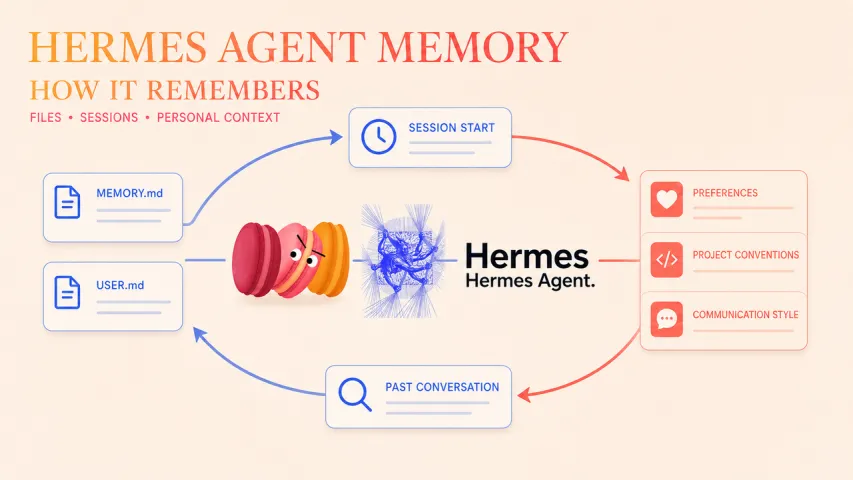
Hermes documents bounded, editable memory for preferences, environment facts, and lessons. Its persistent memory guide says memory loads as a frozen snapshot at session start; new saves enter prompt context in the next session. Past sessions are searchable separately.
Memory is therefore selective and capacity-limited, not a complete record. Our guide to long-term AI memory covers the everyday experience.
The Difference Between Remembering Work and Knowing a Person
Remembering a format or project convention is useful. Knowing when it no longer applies requires context and often a question. Official product claims do not independently validate deep personal understanding.
Setup, Permissions, and Privacy Trade-Offs
Hermes can scan repositories, browse files, run tools, use network services, and accept microphone input when voice is enabled. The Desktop guide documents controls to disable or narrow repository scanning. Approval settings and alternative execution backends exist, but profiles alone do not restrict filesystem access.
Privacy depends on the provider, enabled tools, backend, credentials, and operating-system permissions. Review them before exposing personal files. “Runs locally” does not necessarily mean all processing remains local.

Who Should Try Hermes Desktop
Try this personal AI desktop if you value configurable providers, visible permissions, cross-interface sessions, and reusable procedures. Skip it if you want zero setup, independently proven reliability, or deep personalization without configuration.
FAQ
Does Hermes Desktop update automatically on every supported operating system?
Official documentation says the app checks in the background and offers a one-click update. It does not provide an OS-by-OS guarantee of silent installation as of August 19, 2026, including for the Linux terminal route. Check the release page and in-app prompt.
Can the desktop app connect to a remote Hermes installation?
Yes. Desktop can connect to a reachable remote hermes serve backend that remains running and requires authentication. Official guidance recommends OAuth for internet-reachable hosts and username/password only on trusted networks or VPNs.
Can separate profiles use different model providers?
Yes. The profiles guide says Hermes profiles—not OS user accounts—have separate config, API keys, memory, sessions, and Skills. Each can use its own provider and default model.
What happens to local data when Hermes Desktop is removed?
The Danger Zone offers three scopes: remove the GUI while keeping the agent, config, and chats; remove the GUI and agent while keeping user data; or remove everything. Official documentation does not enumerate every platform-specific residual path there.
Where should users report a Desktop security issue?
Use the security policy: report privately through GitHub Security Advisories or security@nousresearch.com. Do not post a vulnerability publicly.
Conclusion
- Try it if: you want visible activity, configurable providers, reusable Skills, and cross-interface continuity.
- Skip it if: you expect proven hands-off reliability or deep understanding without careful setup.
- Verify first: provider data handling, enabled tools, filesystem and microphone permissions, profile boundaries, remote authentication, and the latest release.
Hermes Desktop can become a useful personal agent workspace. Current evidence does not justify calling it deeply personal AI yet.
Previous Posts










Apply to become Macaron's first friends
Read & discover
AI Personal Assistant
Free calculators


