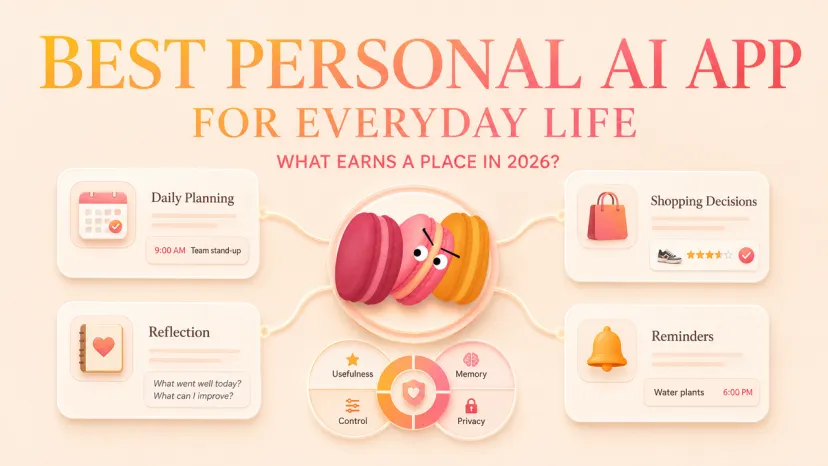
The best personal AI app is not one universal winner. It is the app that fits the daily task you actually want to repeat, while giving you enough control over memory, mobile access, setup, privacy, and cost. For broad planning and small decisions, ChatGPT is a flexible starting point. Macaron is the life-first option for people who want persistent context and generated mini-apps. Replika is built around companion-style conversation. Microsoft Copilot makes the most sense when your needs lean toward the Microsoft ecosystem—but personal and work contexts should remain separate.
This is an official-source comparison, not a hands-on test or a performance ranking. Start with one low-stakes task and see which trade-off you can comfortably live with.
Quick Verdict: Choose by Daily-Life Fit, Not Hype
For someone seeking the best AI app for everyday life, the practical choice starts with purpose. Choose ChatGPT for a broad assistant that can help you plan, compare, write, learn, and think through ordinary decisions. Choose Macaron when continuity across personal-life conversations and reusable mini-apps matter more than granular memory deletion. Choose Replika when ongoing conversation is the main experience, not a side feature. Choose Microsoft Copilot when you already use Microsoft tools and want a general assistant that can extend toward work—but keep account, data, and memory boundaries visible.
App
Primary fit
Verified memory control
Mobile access
Current cost signal
Important limitation
ChatGPT
Broad planning and small decisions
View, delete, or disable saved memory; Temporary Chat available
Web, iOS, Android
Free and paid plans
Full removal of a remembered detail can require deleting both memory and related chats
Macaron
Life-first continuity and mini-apps
Account deletion available; individual memory deletion is not currently offered
iPhone and Android
Free download; subscriptions and in-app purchases
Less granular memory control than the other shortlisted apps
Replika
Companion-style conversation
Visible Memory area; individual memories can be removed
Web, iOS, Android
Limited free use; paid subscriptions
Conversation-first design may not suit practical task management
Microsoft Copilot
Microsoft-centered personal and work-adjacent use
View, edit, delete, or disable personal memory; activity history can be deleted
Web, desktop, iOS, Android
Free baseline; paid Microsoft 365 options
Personal Copilot and Microsoft 365 Copilot have different account and data contexts
What Makes a Personal AI App Worth Using
Memory That Helps Without Taking Over
Useful memory saves repetition, but visible control matters as much as recall. Look for a way to inspect what the app remembers, correct it, delete it, pause it, or use a temporary session. If you want the broader category explained first, see this personal AI agent guide. For a narrower memory-focused comparison, use the memory app guide.
Daily-Life Tasks Beyond Work Productivity
A daily life AI app should earn its place through a recurring personal task: planning meals, arranging a week, remembering a preference, comparing purchases, learning, journaling, or thinking through a reversible decision. It should not require you to turn home life into a workplace dashboard. Nor should it make consequential health, legal, financial, or relationship decisions for you.
Setup Effort, Availability, and Cost Signals
The best AI for personal life should not create more administration than it removes. Check the official store listing and subscription screen in your region before committing. “Free” may mean limited use, while memory, voice, or higher limits may sit behind a paid plan. Also count onboarding time: a personality setup, connected account, or permission request is part of the cost even when no money changes hands.
Best Personal AI App Shortlist by User Need
For Daily Planning and Small Decisions
ChatGPT may fit people who want one flexible starting point. It is a plausible best personal AI assistant app for users who value breadth over a single specialized experience. OpenAI presents it as a tool for everyday questions, comparing options, learning, drafting, and decision support. Its memory controls let users ask what it remembers, remove saved memories, disable memory, or open Temporary Chat. It is available on the web and mobile, with free and paid plans.
The trade-off is control complexity: deleting a chat does not necessarily delete a saved memory from that chat. OpenAI says fully removing a remembered detail can require deleting both the saved memory and the relevant conversation.
Macaron may fit people who want life-first continuity plus practical mini-apps. Official pages describe Deep Memory that carries preferences and context across conversations, while the app can turn a plain-language request into a personal tool. Current official links show iPhone and Android availability.
Its clearest trade-off is memory control. Macaron's FAQ says users cannot currently delete a specific memory. Its privacy policy does provide account deletion in the app or by email, and projects can be deleted separately. That distinction should matter if granular correction or removal is a priority.
Replika may fit adults who want an ongoing AI companion experience. Its official site and mobile listing center conversation, continuity, proactive check-ins, and remembered people, plans, and interests. The Memory area lets users inspect saved items and remove an individual memory. Replika is available on the web, iOS, and Android; limited free use and paid subscription programs are documented.
The main trade-off is category fit. Replika is designed around a continuing companion relationship, so it is a weaker match when your main need is structured planning or practical output. Its current privacy policy says the service is for users aged 18 or older and advises against sharing sensitive or third-party personal data.
Microsoft Copilot may fit people already using Microsoft services. The personal product is available free on the web and through mobile and desktop apps, while paid Microsoft 365 options add productivity features. Personal-account privacy controls allow users to view, edit, or delete remembered details, disable personalization and memory, and delete activity history.
The trade-off is context complexity. Consumer Copilot and Microsoft 365 Copilot are not the same data environment. Before connecting work files or accounts, decide which identity owns the conversation and who can administer the workspace. The deeper separation is covered in work and personal boundaries.
Ask three separate questions: Can you see a memory? Can you correct or remove one item? Can you delete the account and associated data? A yes to one does not guarantee the others. Turning memory off may also leave existing memories or chat history in place.
Mobile Access and Onboarding Friction
Confirm the listing for your device, country, and operating-system version. Then note whether onboarding asks for a personality profile, Microsoft account, notification access, contacts, photos, microphone, or connected apps. Grant only what your chosen task needs.
Decide keep, limit, or remove based on the task result and your comfort with the controls
Privacy, Data Use, and Deletion Paths
Read the current policy, not a store screenshot or an old review. Look for who operates the service, what conversation content is processed, whether third-party AI providers receive inputs, how model improvement works, and what deletion actually covers. Do not test with sensitive health, financial, legal, workplace, school, family, or third-party information.
Use this one-week fit test:
Choose one recurring, low-stakes life task.
Start with minimal personal data and no bulk history import.
Check what the app remembers and whether you can correct or remove it.
Record setup friction, mobile access, permissions, notifications, and any paywall.
Decide keep, limit, or remove based on the task result and your comfort with the controls.
Where Macaron Fits
A Life-First Agent With Deep Memory and Mini-Apps
Macaron is the publisher's product, so its inclusion here is disclosed rather than presented as independent endorsement. The official Macaron personal AI page positions it around everyday decisions, Deep Memory, and tools created from conversation. That makes it a distinct option for people who value continuing personal context and reusable mini-apps.
The same criteria still apply: verify current store availability, subscription terms, permissions, privacy settings, and deletion paths. In particular, weigh Deep Memory against the current lack of individual-memory deletion.
Limitations and Trade-Offs
No Single App Is Best for Every Life Context
Official documentation confirms features and policies; it does not prove response quality, reliability, safety, or satisfaction. Availability and pricing vary by account, platform, and region. Memory can be helpful and still be wrong. App-store ratings can signal patterns, but they shift with version, country, and time. Treat every shortlist entry as a candidate for a bounded trial, not a promise.
FAQ
Can I test an app without importing old personal data?
Yes. Use a separate, low-sensitivity task, deny unnecessary contacts or photo access, and avoid importing chat history. Before adding more context, confirm that you can delete the trial conversation, memory, or account through the documented path.
How should I compare app store reviews and rankings?
Check the platform, country, app version, and review date. Look for repeated issues and recent developer responses rather than trusting the average star score. Distinguish store charts, editorial selections, sponsored placements, and independent rankings; none is product truth by itself.
What should parents ask before recommending a personal AI app?
Verify the provider's current minimum age, who owns the account, what data is collected, which permissions are requested, what content controls exist, how purchases work, and what adult oversight is available. Do not assume a general age rating means an app is suitable for a particular child. Ask the provider when documentation is unclear.
Can a personal AI app support multiple languages well?
Check each needed mode separately: interface, typed input, generated text, voice input, voice output, and translation. An app may support one without supporting the others equally. Confirm the current official language list, then run a low-stakes sample in the exact language and mode you need.
What permission changes should I review after installing?
Recheck microphone, photos, contacts, notifications, location, background activity, and connected accounts. Review both the app's privacy settings and the operating system's permission screen. Remove anything your one chosen task did not require.
Conclusion
The best personal AI app for life is the one that completes a real recurring task with acceptable setup, memory, privacy, and cost trade-offs. ChatGPT offers breadth, Macaron emphasizes life-first memory and mini-apps, Replika centers companion conversation, and Microsoft Copilot fits Microsoft-oriented use. A one-week, minimal-data trial gives you a more reliable answer than hype, rankings, or novelty.
I’m Maren, a 27-year-old content strategist and perpetual self-experimenter. I test AI tools and micro-habits in real daily life, noting what breaks, what sticks, and what actually saves time. My approach isn’t about features—it’s about friction, adjustments, and honest results. I share insights from experiments that survive a real week, helping others see what works without the fluff.