Personal AI Secretary
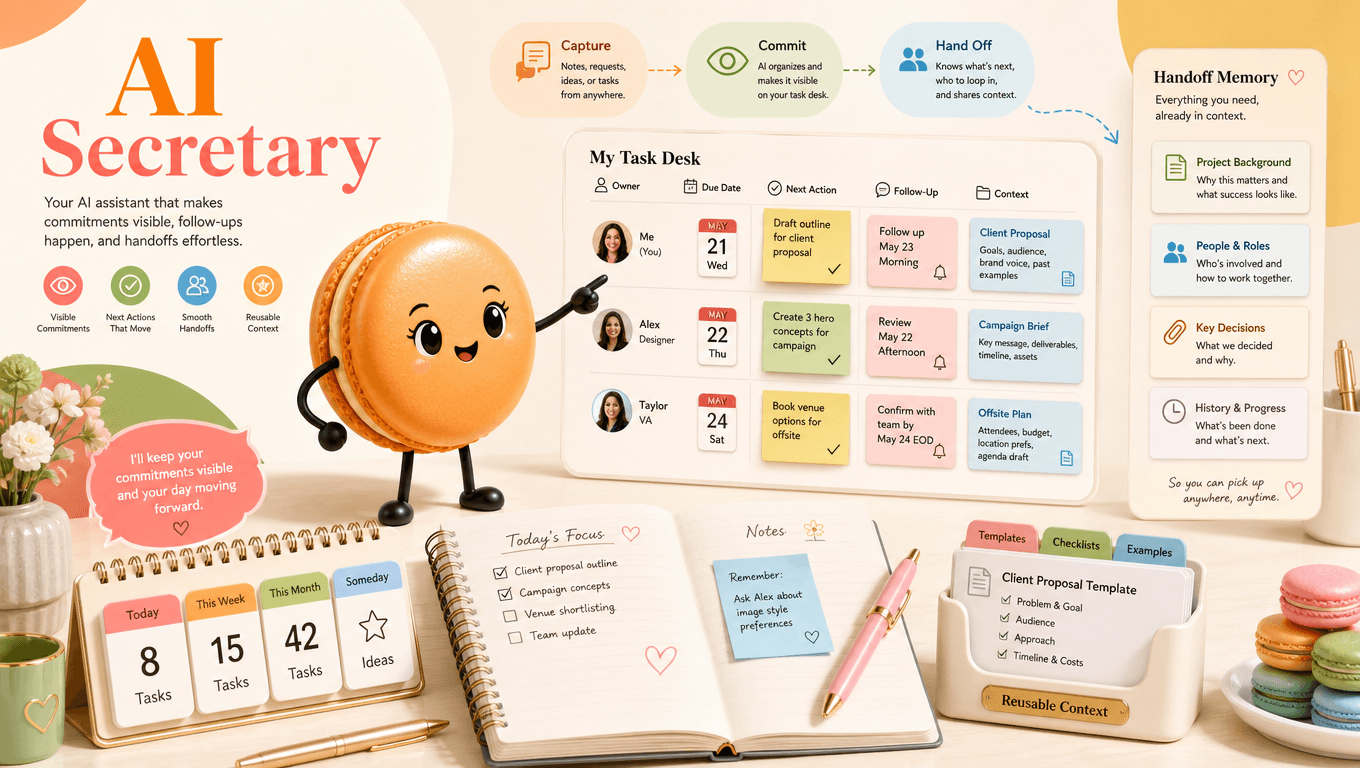
A personal AI secretary is most useful when it makes commitments visible. This page includes a working task desk for capturing an owner, due date, next action, and follow-up check. Tell Macaron the owner, deadline, and what “done” means in one sentence. Deep Memory can keep the context you choose, so the next handoff starts with One-off note instead of an empty note. You can build a secretary project around the workflow you already use.
What a Personal AI Secretary Actually Does for You (and What It Won't)
What a Personal AI Secretary Actually Does for You (and What It Won't)
A useful secretary separates the request from the commitment. It records what must happen, who owns it, when it is due, and what evidence means the task is complete. The Your TaskMaster interface is a useful reference for One-off note. The embedded component on this page handles Task desk.
Meet Macaron: A Personal AI Secretary That Remembers the Context You Choose
Macaron can be asked to create a personal project around those fields and remember context you intentionally add. The embedded desk below is the immediate version: enter one task, review the generated handoff, then copy or download it. Describe the job in plain language: Key points:
- "Turn this request into an owner, deadline, and next action."
- "List the commitments that still need a follow-up date."
From one sentence to a secretary workspace you can revisit: A personal AI secretary should not just capture tasks. It should remember the context behind them: who asked, why the work matters, what counts as done, and when you want to revisit it. In Macaron, you can keep that context beside the owner, deadline, and next action, then inspect the handoff before using it. Keep three things explicit: One-off note, Calendar event, and Task desk. When one changes, tell Macaron what changed and request a revised handoff; this page does not claim that messages are sent or calendars are edited automatically.

One Sentence In, a Reviewable Task Handoff Out
Short input works when the output remains inspectable. A request such as ‘follow up on the vendor quote Friday’ should become a dated action, not a vague summary. Key comparisons:
- Workflow step: One-off note; Remembered context: Fast capture; Manual update: No owner or review point
- Workflow step: Calendar event; Remembered context: Time is visible; Manual update: Not every task belongs on a calendar
- Workflow step: Task desk; Remembered context: Owner, date, and next action; Manual update: Requires deliberate updates
How to use the table: Use One-off note to capture the starting point, keep the relevant context under Calendar event, and confirm Task desk yourself.
Why 'Understanding You' Beats Just Being Fast
Speed matters less than continuity. The practical advantage is seeing the same names, preferences, and open loops when you return. Example: After a project call, capture three promises separately. The downloaded handoff can be pasted into the team's existing system after each owner confirms it. Before using the result, they review One-off note and note what changed under Task desk.
Related next steps
build a one-habit check-in, organize a group decision, turn a work intention into a goal.
Frequently Asked Questions
No. This page creates a reviewable task handoff with an owner, due date, next action, and follow-up point. You can copy that handoff into an approved calendar or reminder system, but the page does not send notifications or update external apps automatically.
No. The component only uses the dates, events, and context you choose to enter. If a meeting or deadline changes, update that information and generate a revised handoff rather than assuming the task desk has refreshed automatically.
A useful task should include a clear action, an owner, a due or review date, the next step, and evidence that defines completion. Macaron can retain the context you provide, but the owner and deadline should still be confirmed before the handoff is used.
Yes. You can copy the generated handoff or export it as a text file for use in another workspace. Review names, dates, and responsibilities before sharing it, because the component does not verify those details with other people or systems.
Read & discover
Explore Playbooks
AI Personal Assistant
Free calculators


