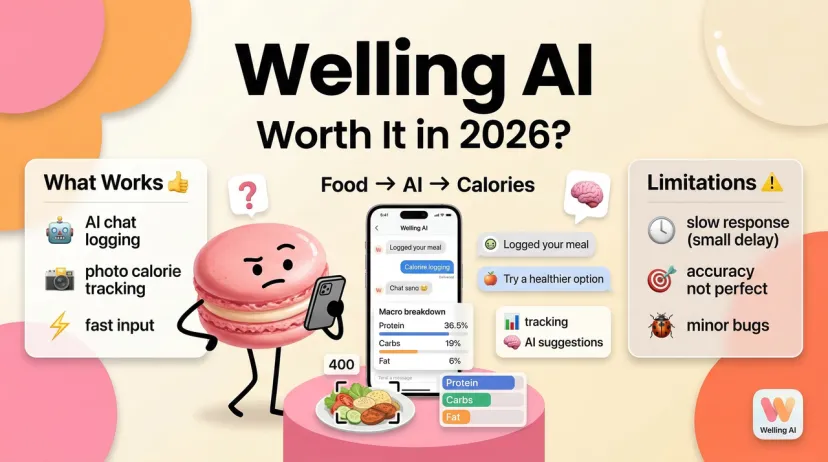
If you've landed here because you're trying to figure out whether Welling AI is actually worth downloading or just another calorie tracker with a chat window slapped on top, this review skips the marketing copy and gets into what the thing does.
I ran it through two weeks of real daily logging — not curated demo meals, but mixed dishes, restaurant food, and the kind of meal where you're not entirely sure what went into it. Here's what held up, what needed correcting, and what I would check before paying for a longer plan.
What Is Welling AI?
What it tracks and what it claims to do
Welling is a Singapore-based AI nutrition app that positions itself as a conversational food and health coach. Instead of searching a food database and manually entering everything, you describe your meal in chat or send a photo, and Welling estimates the calories and macros.
Beyond food, it tracks activity, body weight, and water. Its official FAQ also documents voice dictation, nutrition-label photos, a barcode mode, and manual corrections to food entries. Daily and weekly summaries show calories, macros, and estimated fiber, sodium, and sugar. Welling can suggest meals, answer nutrition questions in chat, and send tracking reminders.
Who it's built for
Welling is built for people who've tried traditional food logging apps and abandoned them because the data entry is too tedious. The pitch is explicitly anti-friction: describe the meal, done. That part worked for me more often than opening a database search, particularly with meals that didn't have an obvious packaged-food match.
It is less suited to anyone who needs a full vitamin-and-mineral panel, a fasting timer, or exact numbers for a clinical diet. Describing a meal takes less effort than weighing every ingredient, but it also leaves more for the app to estimate.
Welling AI Features Breakdown
Health and wellness tracking
Food can go in as text, voice dictation, a meal photo, or a nutrition-label photo. Welling also lists a barcode scanner, currently optimized for U.S. products. Text remained the most straightforward option for me when a photo couldn't show what was in a sauce or how much oil had been used.
A label photo starts from the label's stated serving size, so tell Welling if you ate more or less than one serving. If the saved estimate looks wrong, you can tap the entry and change the portion, calories, or macros. You can also give the coach more context in chat, such as an ingredient it missed.
Activity can be described in chat. On iOS, Welling says it can sync steps, workouts, and weight through Apple Health; weight can also be logged in chat. And one correction to the earlier description of its features: Welling does support water logging. Its FAQ directs users to Progress > Water. It estimates fiber, sodium, and sugar, though it does not provide a full vitamin-and-mineral panel or fasting schedule tracking.
AI-generated insights and suggestions
The chat handles more than logging. You can ask what might fit your remaining daily targets, request meal ideas, or ask for a weekly plan. Welling recommends giving it specifics — preferred foods, which days you'll cook, budget, and available time. That's a better test than asking for a generic “healthy meal plan” and judging the first answer.
The useful boundary is that a suggestion is still a suggestion. I wouldn't use a generated meal plan as an allergy check or treat its nutrition advice as a clinical plan. If a nutrient target comes from a clinician, use that target and verify relevant food entries against labels or another reliable reference.
App experience and interface
The main workflow is chat; Progress holds daily and weekly summaries. You can inspect which foods contributed to a macro, edit past entries, and save a repeated recipe as a Favorite. That last feature matters if you eat the same lunch often and don't want to describe it from scratch each time.
Welling is available on iOS and Android. Its Android store listing describes Health Connect support, while the FAQ gives Apple Health instructions for iOS. Check the integration you need on your own device rather than assuming the two versions behave identically.
A one-meal check before you trust the numbers
Here's the check I'd use during a trial. Start with one meal you can describe fairly well — say, chicken rice with broccoli, sauce, and a known or estimated chicken portion. Log it by text. Before looking at the calorie total, check the saved ingredient list and portions. If you don't know how much oil or sauce was used, leave that uncertainty visible to yourself. A plausible total doesn't make the unknown ingredients known.
Next, correct one thing you do know. Change a portion to a measured amount or one stated on the package. Ask Welling to revisit the meal with that detail, then reopen the saved entry. Check both the chat's reply and the stored numbers; a helpful reply isn't much use if your food log still contains the old estimate.
Finally, ask which part of the meal remains an estimate. If you log the same meal by photo for comparison, delete the duplicate entry afterward. This checks three different jobs — recognizing food, accepting a correction, and handling uncertainty — instead of judging the app by whether its first calorie number looks believable.
Welling AI Pricing
What's free vs what costs money
Welling is free to download, but its Android store listing says a subscription is required to access the app's features. Its FAQ says free trials are typically offered on longer plans. I wouldn't assume there's a useful permanent free tier or that every plan includes a trial.
The price information needs a careful read. When I checked the U.S. App Store listing in October 2026, it showed several monthly in-app purchases from $9.49 to $22.99 and annual ones from $59 to $119.99, plus three-month options. Welling's FAQ still mentions a six-month plan. The public list doesn't establish which offer you'll actually see at checkout in your region.
Compare the offers available on your checkout screen: divide the annual total by 12 to get its monthly equivalent, then put that beside the monthly plan and check the renewal price. A lower monthly equivalent won't help if you're paying for a year when you only need a short experiment.
Is the paid tier worth it?
The honest test is to use whatever trial your checkout offers and log the meals you'd normally skip. Over a week, note how often you had to correct an ingredient or portion and whether you kept logging after the novelty wore off.
If you're still fixing most entries, the chat interface may not have removed enough work to justify the price. If it helps you record meals you'd otherwise omit, that's a stronger reason to pay than a promise of perfect AI nutrition advice.
Where Welling AI Delivers
Strengths vs comparable tools
Friction reduction is real. During my two weeks, describing a mixed dish was easier than trying to find a database entry that seemed close enough. That doesn't mean Welling was automatically faster or more accurate than every competing app; I didn't run a timed, like-for-like comparison.
There are several ways to enter a meal. Text, dictation, photos, labels, and barcodes cover different situations. A packaged product with a clear label is a different problem from a restaurant curry with unknown oil and portion size.
Corrections remain in your hands. Welling documents both chat follow-ups and manual edits to saved entries. The correction tools help, but you have to spot the mistake first — which is why I checked ingredient lists and portions instead of accepting a plausible-looking calorie total.
Water and repeat meals are covered. Water logging and saved Favorites make the app more useful as a daily log than its chat screen alone suggests.
International food is part of its pitch. Welling advertises coverage for Asian and other regional dishes, and mixed meals were part of what I logged. I wouldn't call it categorically better than another app for those foods without entering the same meals in both.
Where It Falls Short
Accuracy limitations
This is the caveat that matters most. Welling estimates food type and portion from the description or image you give it. Its FAQ says errors can come from a wrong portion, a branded food missing from its database, or the AI itself. A photo of a mixed dish can't tell you how much oil went into it or reveal every ingredient under a sauce.
In my daily logging, simple whole foods such as chicken, rice, and vegetables were easier to check. Complex dishes and restaurant meals were less certain — sometimes close, sometimes seemingly off by 20–30%. That's an observation from my use, not a measured error rate from weighed reference meals. I wouldn't use it to claim that Welling is more or less accurate than Cronometer, MyFitnessPal, or another tracker.
For a packaged food, inspect the label and serving size. For a homemade meal, correct any ingredient amount you know. Leave unknown restaurant preparation as an estimate. That distinction matters especially when a number affects a medical decision; Welling's own FAQ says its advice is informational and directs medical questions to a qualified professional.
Features that feel underbaked
A full vitamin-and-mineral panel is absent. Saying Welling has “no micronutrient tracking” would overstate the gap, because it does estimate fiber, sodium, and sugar. Likewise, water logging is supported; the missing feature is fasting schedule tracking.
Meal plans depend on the constraints you provide. Open-ended requests can leave too much for the chat to guess, while specific food, time, and budget requirements give it something useful to work with. Welling's FAQ says it does not support nutrition-data import or export, but its July 2026 iOS release notes say PDF/CSV export was added. Check what your app version can export if you want to move a long history of logs elsewhere.
Who Should Try Welling AI
Good fit
People who've quit traditional calorie trackers because entering meals took too much effort
People willing to inspect portions and correct mixed-dish estimates
People who want food, water, activity, and simple meal suggestions in one conversational workflow
iOS users who want Apple Health sync, after confirming it works on their device
Not a good fit
Anyone who needs a full vitamin-and-mineral panel or fasting timer
People who require precise food records for a medical or clinical protocol
People unwilling to check AI estimates against labels or known portions
Anyone who needs a complete export of their nutrition history without first verifying what Welling's export feature supports
Verdict
Welling's main win in my two weeks was making it easier to log meals I might otherwise have left out. Describe or photograph a meal, inspect the estimate, correct the entry, and ask a follow-up: that workflow is more useful than the chat interface alone makes it look.
The trade-off is that easy entry doesn't remove uncertainty. I still had to check portions and ingredients, especially for restaurant food and mixed dishes. My experience also isn't a controlled comparison with another app, so I wouldn't make a precision claim from it. If logging friction is your problem, Welling is worth trying during an available trial. If you need detailed micronutrients, fasting schedules, or clinically precise records, it isn't the right fit.
At Macaron, the question after you start tracking is often what to do with the routine you've built. If planning meals around your schedule is the part you need help with, Macaron's AI Meal Planner can build a plan around preferences, time, and budget. It doesn't verify Welling's calorie estimates; use the log and the plan for their respective jobs.
FAQ
Is Welling AI free?
It is free to download, but its Android store listing says a subscription is needed to access features. Welling says trials are typically offered on longer plans. Check the trial length, total charge, and renewal date in your own checkout; its public FAQ and store listings do not show one consistent set of plans.
How does Welling AI compare to MyFitnessPal?
MyFitnessPal starts with a searchable food database and manual logging; its barcode scanner is a Premium feature. Welling starts with chat or a photo and also offers barcode mode. For packaged food, compare the saved entry with its label. For a mixed meal, enter the same ingredient and portion information in both apps and see how much correction each needs. My two-week Welling trial was not a head-to-head test, so I wouldn't declare either app faster or more accurate overall.
Hey, I’m Hanks — a workflow tinkerer and AI tool obsessive with over a decade of hands-on experience in automation, SaaS, and content creation. I spend my days testing tools so you don’t have to, breaking down complex processes into simple, actionable steps, and digging into the numbers behind “what actually works.”